STEP 3: INSTALL the Department of Defense (DoD) CERTIFICATES |
||||||||||
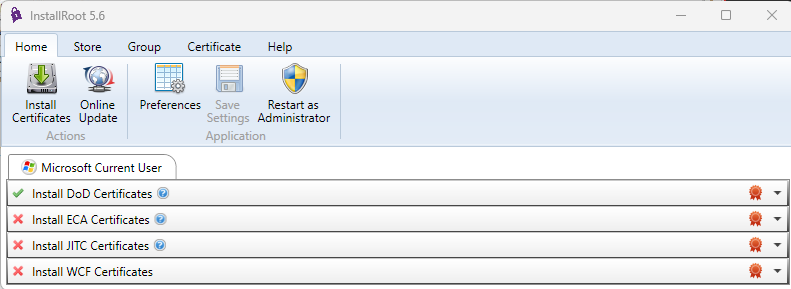
InstallRoot automates the install of the DoD certificates onto your Windows computer
To access many DoD websites from your computer, you need these certificates on your computer. You may need to reinstall the certificates if the CAC enabled web site won't load, the website you are visiting is prompting you with the message there is a problem with the website's Security Certificate / site is not trusted, you have received a new CAC, or your DoD website worked up until recently and doesn't now.
Apple computer users follow these instructions
Windows RT / Windows 10 S mode users follow these instructions (or anyone not wanting to install the InstallRoot 5.6 program below)
Chromebook users follow these instructions
InstallRoot was created by DISA for Windows computers, if you have any problems with this file, please contact them. NOTE: If you do not want to install the InstallRoot program, or having problems with the InstallRoot file, you can install the certificates manually by, following these instructions.
Windows users, Download InstallRoot 5.6 from:MilitaryCAC (.msi version) (27.7 MB), MilitaryCAC (.zip version) (25.9 MB), or DoD Cyber Exchange (.msi version) (27.7 MB)
(It is the same file [except for .zip version] from two different servers, in the event one of the links don't work)
Select Next > .
Leave the default installation location, then select Next > .
Select Next > .
Select Install .
Wait for it .
. Select Run InstallRoot . .
Click Install Certificates (down facing green arrow) If you have Firefox installed, you may see 2 or 3 tabs
NOTE: I have two people who informed me they had to select Restart as Administrator. These are the only two people in the several years this program has been in existence that I have heard this.
InstallRoot not updating was fixed in InstallRoot 5.2 & newer
Select Yes, (this screen may show 2 - 4 times) as it is installing each of the DoD Root CA 3, 4, 5, & 6 certificates .
Select OK (your number of Adds will vary)
. How to verify you have the certificates installed
Type Internet Options in the bottom search box
Select Content (tab), Certificates (button)
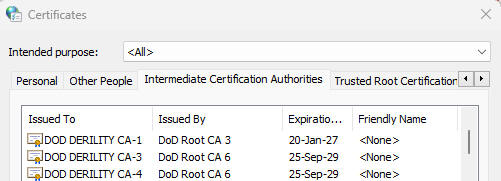
Intermediate Certification Authorities (tab) scroll down the Issued To (column) to the letters DOD to verify you have: DOD DERILITY CA-1 and CA-3 through CA-4
DOD EMAIL CA-59
DOD EMAIL CA-62 through DOD EMAIL CA-65
DOD EMAIL CA-70-73
DOD ID CA-59
DOD ID CA-62 through DOD ID CA-65
DOD ID CA-70 through DOD ID CA-73
DOD SW CA-60 through DOD SW CA-61
DOD SW CA-66 through DOD SW CA-69
and
DOD SW CA-74 through DOD SW CA-77
Verify the DoD Root certificates installed (sometimes Antivirus / Security programs won't allow these to be installed)
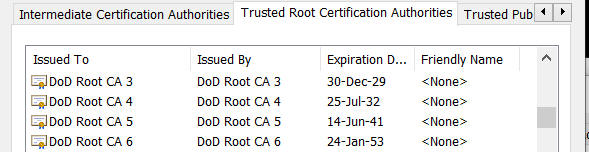
Open the Trusted Root Certification Authorities (tab) verify you have: DoD Root CA 3 through DoD Root CA 6
If you see "There is a problem with this website's security certificate" after installing the DoD InstallRoot file or the Red Certificate error below, follow this guide
PROCEED TO STEP 4 - INSTALL ACTIVCLIENT
The Cross Cert Remover tool is "supposed" to be an automated way of removing some certificates that cause access problems. From what I've experienced, you still need to follow my guide [slides 16&17] and manually remove certificates the Cross Cert Removal Tool fails to remove. Feel free to use if you want to waste your time.
You can install both the InstallRoot and the Cross Cert Removal tool in one single file which was created by NETCOM (Army Network Enterprise Technology COMmand) This file is created for Home Users ONLY, you can download it from:
https://militarycac.com/CACDrivers/HomeUserCertTool_V06.zip
Information:A certificate is a digital document providing the identity of a Web site or individuals. DoD Web sites use a certificate to identify themselves to their users and to enable secure connections. If you are receiving a warning that a site is untrusted / insecure, you will need to install the "DoD Certificates." In order to access sites enabled with a DoD PKI certificate without being prompted to accept the DoD Certificate chain at each log on [like Firefox and Safari do], people using Internet Explorer and Chrome should install the DoD certificates. These are separate from the personal certificates that are on your CAC, but they are related.
Root Certificates
How can you (or your web server) trust the identity of someone over the network? An infrastructure of trusted third parties has been put in place to distribute trust between end-users. This infrastructure verifies that we are who we say we are. If we trust the DoD PKI infrastructure, then the infrastructure can vouch for us to trust others that have certificates issued from the DoD PKI.
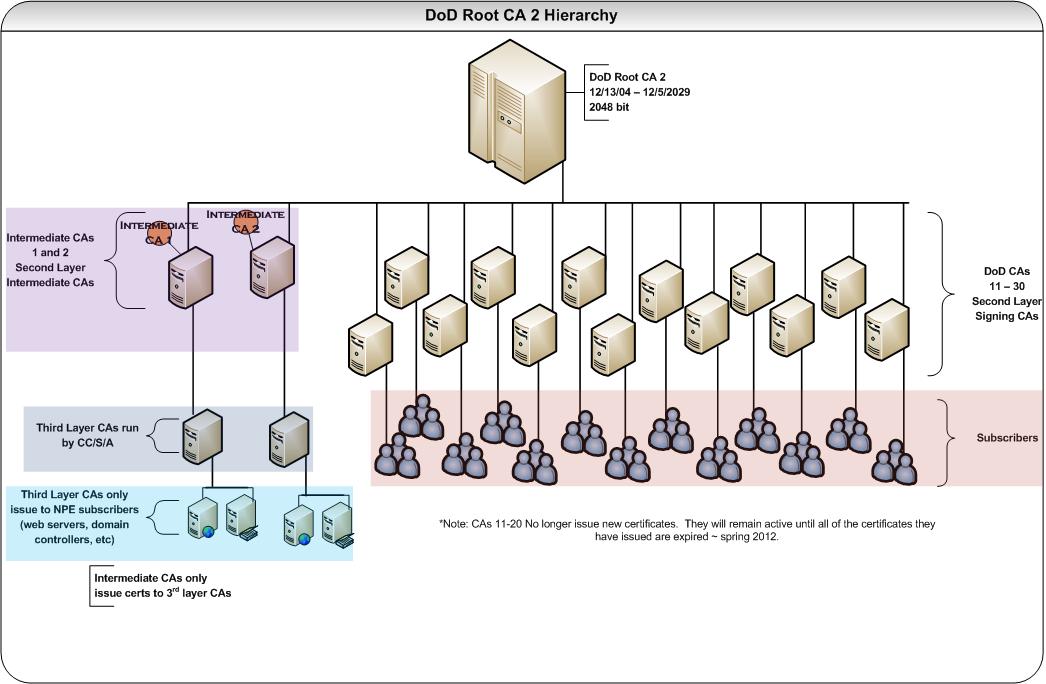
Click to see larger image . The DoD PKI Infrastructure is comprised of two Root Certification Authorities and a number of Intermediate Authorities. If all of the DoD root certificates are not installed on your computer, various applications will not be able to trust all DoD PKI certificates.
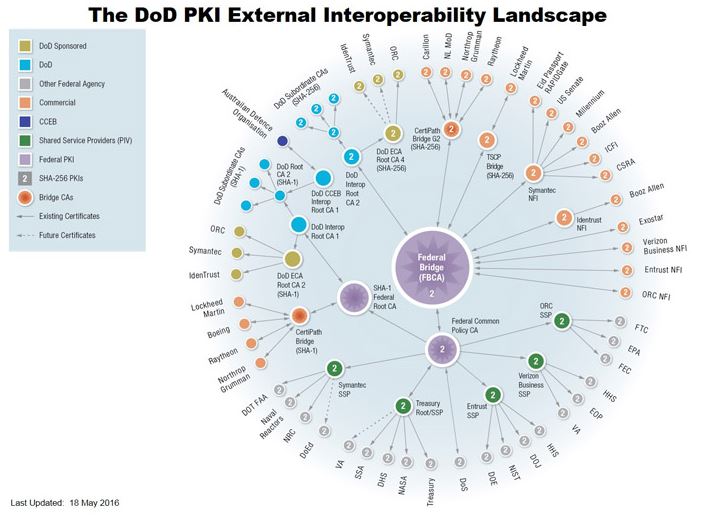
Click to see larger image . More information about this image can be found here: https://iase.disa.mil/pki-pke/interoperability/Pages/index.aspx
|
||||||||||
If you have questions or suggestions for this site, contact Michael J. Danberry
Last Update or Review: Tuesday, 23 April 2024 19:57 hrs
The following domain
names all resolve to the same website: ChiefsCACSite.com,
CommonAccessCard.us, CommonAccessCard.info, & ChiefGeek.us
|