APPLE MAC CAC ENABLER (aka MIDDLEWARE) PAGE |
||||||||||||||||||||||||||||||||||||||||||||||||||||||||||||||||||||||||||||||||||||||||||||||||||||||||||||||||||||||||||||||||||||||||||||||||||||||||||||||||||||||||||||||||||||||||||||||||||||||||||||||||||||||||||||||||||||||||||||||||||||||||||||||||||||||||||||||||||||||||||||||||||||||||||||||||||||||||||||||||||||||||||||||||||||||||||||||||||||||||||||||||||||||||||||||||||||||||||||||||||||||||||||||||||||||||||||||||
|
NOTES: Between mid October 2019 and mid February 2020 everyone in the Army was migrated to use their PIV Authentication certificate for Email access. You no longer use the Email certificate for Enterprise Email.
Mac users who choose to upgrade (or already have upgraded) to Mac OS Catalina (10.15.x) or Big Sur (11.x.x) will need to uninstall all 3rd Party CAC enablers per https://militarycac.com/macuninstall.htm AND reenable the built in smart card ability (very bottom of macuninstall link above)
If you purchased your Mac with Mac OS Ventura (13.x.x), Mac OS Monterey (12.x.x), Mac OS Big Sur (11.x.x), or Mac OS Catalina (10.15.x) already installed, you can skip the uninstall part above and follow the instructions below.
Signing of PDFs should work in Mac OS Ventura (13.x.x), Mac OS Monterey (12.x.x), Mac OS Big Sur (11.x.x), or Mac OS Catalina (10.15.x) by adjusting these settings.
Mac users
with Mac OS Mojave (10.14.x) and newer (with 64 bit-processor) can verify if their CAC is blocked by using the
Smart Card Utility app
Follow Tables 1 through 4 below:
PLEASE READ the preliminary Information before you start:
Preliminary Information 1: Restart your computer after installing the CAC enabler before trying to access the CAC enabled site
Preliminary Information 2: Installing multiple enabling programs will cause your system to NOT work. Here's how to uninstall CAC enablers.
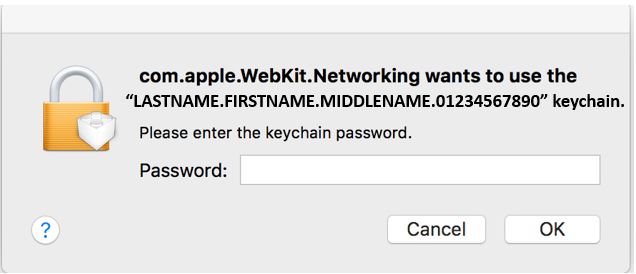
Preliminary Information 3: The CACkey CAC enabler will ask for a "keychain password" (like the image below). You need to enter your CAC PIN. Make sure if it asks for your Keychain password after you select your CAC certificate, that you use your CAC [6-8 digit / all number] PIN.
If you block your CAC, you'll have to visit an ID card
office to get it unblocked. PKard has the capability to show you when your CAC is blocked.
Mac OS 10.15.x and 10.14.x can download this app
Table 1: See which CAC enabling program will work with your version of Mac OS
Once you've decided, go to Table 2
Note2: Need version 1.7 (or above) Note3: Apple computers with Mac OS Big Sur (Intel), Catalina, Mojave, High Sierra, and Sierra have a "built in Smart Card ability," meaning 3rd party CAC enablers are no longer needed. Please uninstall all CAC enablers you have installed Note4: One person has informed me this works for him, but NOT when using Safari. Only using Chrome. Note5: With Mac OS Sierra and High Sierra, you must use Google Chrome. Safari is not "CAC compatible." You may also update your computer to Mojave (or newer), then use Safari again. Note6: Mac OS Catalina will not work with 3rd party CAC enablers installed. Please uninstall all CAC enablers you have installed. INFORMATION: There was an issue with 10.15.4. If this is the version you have, please update to 10.15.5 or above Note7: I have a few reports that this enabler works with Mac OS Catalina
Table 2: Verify the CAC enabling program you selected above will work with your specific CAC. Click here if you are unsure which CAC you have
Once you've decided, go to Table 3
Note1: I haven't heard of anyone with this CAC and specific enabler. If you have one and have successfully used your CAC with the question marked enabler above, please contact me Note2: Will not work with Mac OS 10.15.7, works with previous versions
Table 3: Verify the CAC enabling program you selected in tables 1 & 2 is: a. Compatible with Firefox (if you plan to use this web browser), b. Will read your PIV Authentication certificate, c. Will allow you to digitally sign PDFs, d. Can show you when your CAC is blocked, e. You want support from the vendor, or f. You want it for free, or pay for it
Once you've decided, go to Table 4 and click the link to the CAC enabler you decided to use.
Note1: PIV cert has to already be exposed Note2: Signing of PDFs on Mac OS Monterey (12.x.x), Big Sur (11.x.x), Catalina (10.15.x), Mojave (10.14.x), High Sierra (10.13.x), & Sierra (10.12.x) can be corrected by following these settings. Some others have installed OpenSC and claim it works.
Note3: You can see if your CAC is blocked by
downloading this app (https://apps.apple.com/us/app/smart-card-utility/id1444710309?mt=12)
Mac OS native does not have this capability built in.
Table 4: Click link below for the CAC enabler you decided to use based on the criteria in tables 1-3 above
DO NOT INSTALL a CAC Enabler in Monterey (12.x.x), Big Sur (11.x.x), Catalina (10.15.x), Mojave (10.14.x), High Sierra (10.13.x), or Sierra (10.12.x) as they all have a built in Smart Card ability.
Navy users: If you still have problems, here is a helpful Navy specific page
Specifics for the following versions of Mac OS can be found at these links:
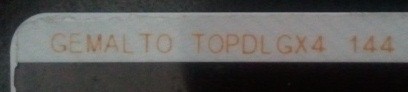
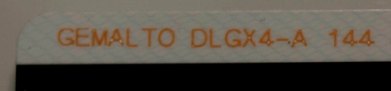
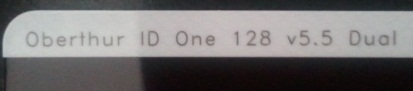
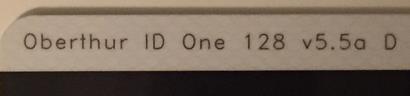
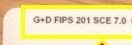
The current CAC Types are... Look at the back of your ID card (above the black strip) for one of the examples below. If you have any other version, you need to visit an ID card office and have it replaced. All CACs other than these shown below were to be replaced prior to 1 October 2012.
A guide to help figure out which CAC you have
Find out how to flip card over video
Information / download links
Supports Mac OS High Sierra (10.13.x) and Mojave (10.14.x) NOT Catalina (10.15.x) or any newer versions of Mac OS
Purchase PKard from Thursby Software
PKard demo (click Videos tab)
Thursby offers US phone, email, and forums support for the software they've been developing for over 10 years and is 100% made in the USA
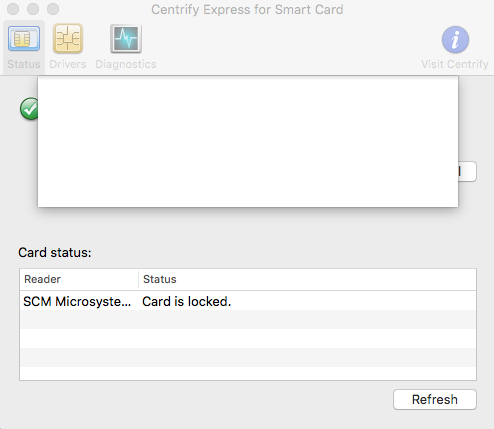
If you have Centrify Express installed, you can see / verify if your CAC is blocked.
Select Go > Utilities > Centrify Double click: Smart Card Assistant Look under status for: Card is locked NOTE: If Card status is blank, the card is not blocked
If you are still having problems, contact us. If you have questions or suggestions for this site, contact Michael J. Danberry
| ||||||||||||||||||||||||||||||||||||||||||||||||||||||||||||||||||||||||||||||||||||||||||||||||||||||||||||||||||||||||||||||||||||||||||||||||||||||||||||||||||||||||||||||||||||||||||||||||||||||||||||||||||||||||||||||||||||||||||||||||||||||||||||||||||||||||||||||||||||||||||||||||||||||||||||||||||||||||||||||||||||||||||||||||||||||||||||||||||||||||||||||||||||||||||||||||||||||||||||||||||||||||||||||||||||||||||||||||
|
Last Update or Review: Wednesday, 27 December 2023 10:49
The following domain names all resolve to the same website: ChiefsCACSite.com, CommonAccessCard.us, CommonAccessCard.info, & ChiefGeek.us
|